Web Hosting
Best Web Hosting Provider in 2026: An Honest Review
FT
Foxtech Engineering Team
Cloud & Devops Specialists • 10 min read • August 14, 2026
Get Started with Hostinger & Support Foxtech
Ready to experience lightning-fast load times, intuitive custom controls, and 24/7 expert support? Launch your new website today with Hostinger using our direct referral link.
Looking for a web host that delivers incredible speed and features without draining your wallet? Here is our honest, developer-backed look at why Hostinger is our top recommendation for businesses and creators alike.
Let's Be Real: Finding a Good Web Host is a Minefield
Finding a reliable web host can feel like an absolute nightmare. You are bombarded with endless lists of technical jargon, empty promises of '99.9% uptime,' and rock-bottom prices that suddenly double or triple when it is time to renew.
At Foxtech, we build and manage hundreds of client websites every year. We have tested almost every host under the sun—from expensive enterprise servers to cheap shared setups. Time and time again, when clients ask us for a recommendation that balances performance, ease of use, and cost, we find ourselves recommending Hostinger.
In this honest review, we'll strip away the marketing fluff and look at exactly why we believe Hostinger has earned its spot as the best web hosting provider for developers, startups, and local businesses in 2026, with a special focus on their game-changing new AI Agent integrations and developer features.
1. The Custom hPanel: A Breath of Fresh Air
If you've ever had to manage a website using the traditional cPanel interface, you know how clunky, confusing, and outdated it feels. On top of that, cPanel licensing hikes have forced many hosts to pass those extra fees directly to you.
Hostinger bypassed this entirely by creating their own custom control panel: hPanel. It is clean, modern, and lightning-fast. Even if you have never hosted a website before, you will find it incredibly easy to navigate. From installing SSL certificates and managing databases to configuring email accounts and viewing server performance logs, everything is laid out in a simple, intuitive dashboard.
2. The New AI Agents Suite: n8n, OpenClaw, and Hermes Agent
Hostinger has taken a massive leap forward by integrating an autonomous **AI Agents** suite directly into the hPanel control system. This is a first for the hosting industry and a dream come true for developers looking to build and deploy agents with zero complex infrastructure management.
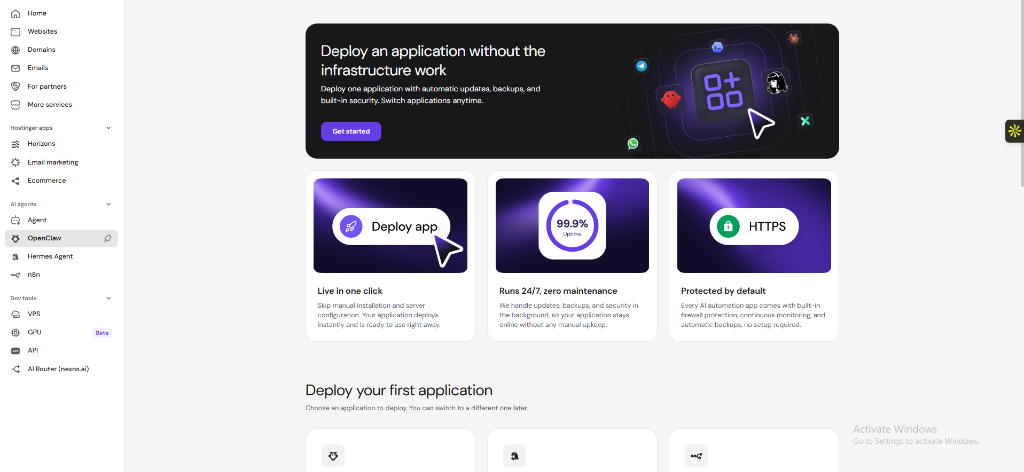
The OpenClaw application deployment portal inside hPanel, showcasing one-click deployments, auto-updates, and SSL configurations.
Let's break down what these integrations actually mean for your workflow:
- n8n (Workflow Automation): n8n is a powerful, node-based automation platform. With Hostinger's native integration, you can build complex automated workflows directly inside your dashboard. For example, you can automatically capture leads from your website forms, format the data, enrich it using OpenAI/Claude APIs, and sync it to your CRM or send instant alerts to your team on Slack/Telegram. It operates like a self-hosted Zapier but with zero extra monthly costs.
- OpenClaw: As shown in the dashboard screenshot above, OpenClaw allows you to deploy AI applications instantly. OpenClaw takes care of the underlying infrastructure so you can host customized AI agent workloads, write agent logic, and run autonomous tasks in a containerized environment with built-in HTTPS/SSL security, automatic updates, and 24/7 uptime stability.
- Hermes Agent: Hermes is Hostinger's autonomous assistant. It operates directly inside your hosting setup, helping you manage code bases, run diagnostics, configure terminal tasks, and automate infrastructure edits in real-time.
3. Professional Dev Tools: KVM VPS & GPU Infrastructure
If you are deploying heavy applications, web scraper scripts, or custom container builds, shared hosting is not enough. You need isolated resources and root control. Hostinger provides this with their **Virtual Private Servers (VPS)**.
Unlike standard VPS hosting which shares resources loosely, Hostinger utilizes **Kernel-based Virtual Machines (KVM)**. KVM guarantees that your allocated CPU cores, RAM, and NVMe SSD storage are 100% dedicated to your server. You get full root SSH access, dedicated IPv4/IPv6 addresses, and simple hPanel-based management.
But what really sets them apart in 2026 is their new **GPU Hosting (Beta)** option. For teams developing AI products, hosting custom machine learning algorithms, or running local LLM configurations close to their site databases, Hostinger's GPU-enabled servers provide the specialized compute power needed to run these workloads efficiently without paying massive AWS premiums.
4. Hostinger MCP & Developer API: Control Hosting Directly from Your IDE
Manual dashboard configuration can slow down deployment velocity. Hostinger solves this by introducing a built-in **Developer API** and an innovative **Hostinger MCP (Model Context Protocol)** connector, bridging the gap between your server and your favorite coding assistants.
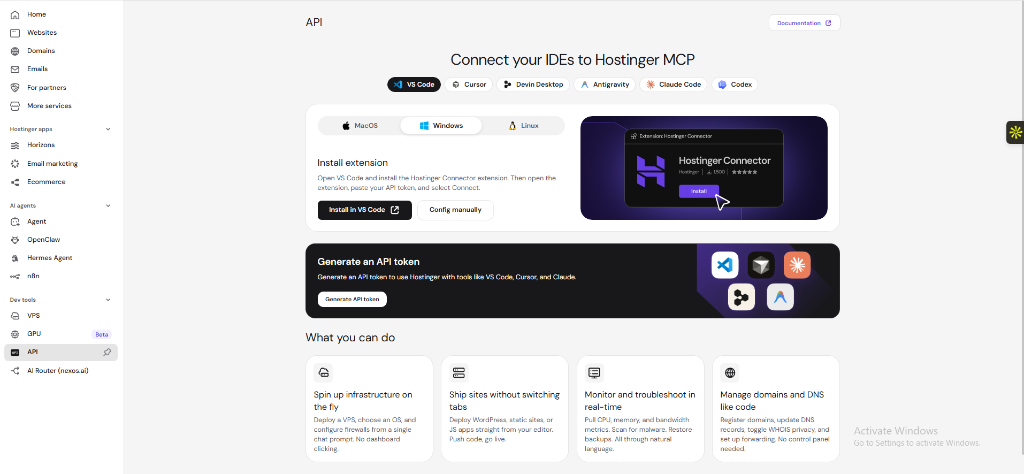
Hostinger's MCP installation screen, supporting integrations with VS Code, Cursor, Claude Code, and Antigravity.
By installing the **Hostinger Connector** extension in IDEs like VS Code or Cursor and generating a secure API token, you can control your hosting ecosystem directly via natural language prompts. Here is what this empowers you to do:
- Spin Up Infrastructure: You can command your AI editor to deploy a new KVM VPS, choose an operating system, or configure firewalls using text prompts—no control panel clicking required.
- Ship Sites Instantly: Deploy WordPress setups, static websites, or JavaScript applications straight from your editor code workspace. Just tell the agent to push code, and your changes go live immediately.
- Real-Time Server Monitoring: Pull server resources (CPU, RAM, bandwidth metrics), run automated malware scans, or restore backup snapshots through natural conversation with your coding assistant.
- Code-Driven DNS Management: Register new domains, update DNS records, configure email setups, and toggle WHOIS privacy configurations programmatically without leaving your code view.
5. Managed WordPress Hosting: Fast, Secure, and Stress-Free
WordPress powers a massive portion of the web, but keeping it running fast and secure isn't always easy. Hostinger's Managed WordPress hosting handles the technical details for you.
With their 1-Click Installer, you can get a fresh WordPress site online in under sixty seconds. Hostinger also includes automated core software updates, weekly or daily backups, and a built-in malware scanner.
But our absolute favorite feature is their **Staging Tool**. If you've ever updated a plugin only to watch your website crash in real-time, you know the panic it causes. With the staging tool, you can create a sandbox clone of your site with one click, safely test updates, designs, or custom code, and then push them to your live site when you are 100% sure everything works perfectly.
They also pre-configure the LiteSpeed Cache (LSCache) plugin on WordPress setups, which means your pages will load incredibly fast right out of the box without needing complex tuning.
6. LiteSpeed Performance: Why Your Site Will Load in a Blink
We can't talk about Hostinger without talking about speed. One of the primary reasons their sites load so quickly is because they use **LiteSpeed Web Servers (LSWS)** instead of the older Apache setups that many hosts still rely on.
LiteSpeed handles high volumes of concurrent connections with far less CPU and memory consumption. Combined with built-in server-level caching, your visitors receive your content instantly. Whether you are running a simple landing page or a heavy WooCommerce store, you will enjoy fast response times and improved Google Core Web Vitals scores right out of the box.
7. Bulletproof Security Built-In
Security shouldn't feel like an expensive upgrade. Hostinger packages standard security tools into all of their plans for free. You get unlimited free SSL certificates for all your domains, custom network-level DDoS protection, automated malware scanning, and regular backups so you can restore your site in one click if anything goes wrong.
The Verdict: Why You Should Host with Hostinger
Hostinger isn't just cheap hosting; it is high-speed, secure, and developer-friendly infrastructure priced for everyday creators and businesses. Their custom hPanel dashboard makes management painless, while their LiteSpeed engines, staging tools, KVM VPS plans, and new developer API/AI Agent suites offer the technical firepower that developers need.
If you are ready to build a faster website, we highly recommend getting started today. Use our direct referral link to check out their plans and secure your exclusive reader discount: Claim Your Hostinger Plan & Discount Here.
#Best Web Hosting Provider#Hostinger Review 2026#AI Agents n8n Hostinger#KVM VPS Hosting#Hostinger Developer API#OpenClaw Hermes Agent
Contact AuthorsRelated Articles
Need Expert Engineering for Your Web or Mobile Product?
Foxtech helps startups and enterprises design, develop, and launch high-performance digital software.